
Delivery
100% online
Virtual labs you run in software
Every week pairs a lesson with a hands-on lab. You command robots, inspect topics, tune controllers, and record what failed — in simulation, using the same tools used in professional robot software.
Hardware is optional. Simulation is required. Labs are issued as briefs on the Courses page; this page describes the environment you work in.
Runtime
Docker containers
Each week
Lesson, lab, project
How a lab session works
Labs follow the same rhythm as the rest of the certificate: a brief, a run in simulation, and a record of what you observed.
Set up the environment
Start the provided Docker image so Python, ROS 2, and the simulator match the lab brief. You do not assemble a custom toolchain from scratch.
Run the experiment
Launch nodes, spawn a robot in Gazebo or Isaac, and complete the assigned behavior — drive, sense, map, or plan.
Record and submit
Save logs, plots, or a short recording. The lab write-up sits beside that week's assignment on the Courses page.
The lab stack
Six platforms you will use across weekly labs and the capstone. The same stack appears in monthly projects.
NVIDIA Isaac
GPU-accelerated robot simulation and perception. Use Isaac when a lab needs high-fidelity sensing, synthetic cameras, or faster-than-real-time worlds.
ROS 2
Nodes, topics, services, and actions. Labs ask you to inspect the graph, publish commands, and connect perception to control.
Python
Scripts that read sensors, send velocity commands, plot trajectories, and glue ROS 2 nodes together. Python is the default language for lab work.
Docker
Reproducible lab containers so every student runs the same ROS 2 distro, Python packages, and simulator versions listed in the brief.
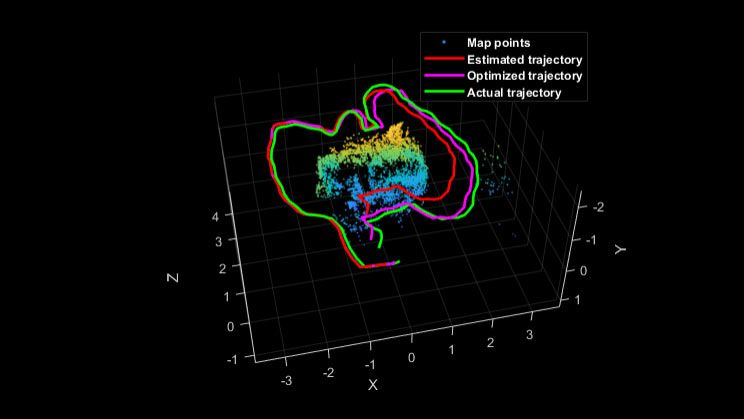
SLAM mapping
Build a map while localizing the robot. Labs compare raw odometry, estimated pose, and an optimized trajectory against ground truth.
Gazebo
Physics simulation for mobile robots and manipulators. Spawn models, attach sensors, and test collision, drive, and pick-and-place behaviors.
Write the code, then watch the robot respond
Labs are software sessions. You edit Python, launch ROS 2, and verify behavior in Gazebo or Isaac — not on a physical bench unless your institution later issues an optional hardware add-on.
Weekly lab briefs live with the lessons on the Courses page. Monthly projects reuse the same stack so a mapping lab in month five still runs in the environment you set up in month two.
Next cohort starts January 5, 2027
Enrollment deadline December 15, 2026. Program fee $1,499. Register to join the six-month sequence of lessons, labs, and projects.